


Even if you are worried that people might think your tutorial is annoying, it is difficult for the creator themselves to judge whether the explanations are insufficient or excessive. This article introduces a procedure for solo game developers who do not have anyone nearby to test their game, allowing them to have an AI review the text and structure of their tutorial from the perspective of a beginner.
Once you finish reading, you will be able to provide information for each screen to the AI and organize points that might be confusing as well as explanations that should remain (official documentation confirmed on October 14, 2026).
■ What you will learn in this article
This article is for those who are making small games for smartphones or Steam and have already created a tutorial. I have prepared the following:
・Input template for information to provide to the AI
・Copy-paste prompt (ready to use as-is)
・Quick reference table summarizing examples of review candidates
・Decision flow for whether to adopt AI suggestions
・Checklist for before and after the review
■ Conclusion first: AI can only review text and structure
AI does not actually play the game. It answers by inferring from the text and structure provided to it.
Therefore, you can only rely on the AI to point out areas where beginners might be confused or where explanations might be redundant. It does not measure actual skipping, operation failures, boredom, or churn.
Even so, if you organize and provide information for each screen, you may find candidates for lack of explanation or redundancy that you would not notice yourself. You should verify these candidates with the actual screen and human reactions.
▼ What you can and cannot rely on AI for
→ Can rely on: Listing candidates for confusing points or redundancies
→ Cannot rely on: Actual gameplay or measuring churn
→ Treat suggestions as candidates to be verified on the actual device
■ Reasons for “getting bored” mentioned in old surveys
In December 2013, CyberZ conducted a survey of 700 smartphone game users.
5% of the total respondents said they “got bored on the same day.” The number one reason cited by these 5% was that the rules or operation methods were difficult to understand (40%), and the second was that the tutorial was too long (34.3%).
Source: CyberZ survey release (January 16, 2014) https://cyber-z.co.jp/news/research/2014/0116_1403.html
In the survey at that time, the length of the tutorial was cited as one of the reasons for getting bored on the same day. It does not necessarily apply to current games as it is.
Also, the number one reason was difficulty in understanding. Simply shortening the explanation is not enough; you also need to see if the necessary information is being conveyed.
■ Mechanism for assigning roles to AI (Official features of Claude and Gemini)
The APIs for Claude and Gemini (the gateway to call AI from your own program) have a mechanism to set the AI’s role before the conversation. This is a setting called “system prompt” in Claude and “system_instruction” in Gemini.
The official documentation for Claude states that setting a role in the system prompt narrows down the behavior and tone to suit the purpose, and that even a single sentence can make a difference. The official documentation for Gemini also explains that you can set the model’s behavior with system_instruction.
This is a mechanism to align the direction of the AI’s answers. It does not mean that it can reproduce the psychology of a beginner.
In this article, we will use the method of writing the role in the first message of a regular chat screen, rather than using an API. No special settings are required on the chat screen. The official documentation explains API settings, and it has not been confirmed (unverified) whether the same effect can be achieved in a regular chat.
■ Step 1: Organize the information to be given to the AI screen by screen
The AI does not know about screens or operations that have not been provided to it. First, write out each screen of the tutorial using the following template. It is fine to mark items you don’t know as “Unknown”.
— Copy from here —
【Target Player: Choose one】
A First time playing this game, but familiar with the genre
B Inexperienced with this genre, but plays other games
C Unfamiliar with game controls themselves
【Device used and input method】Example: Smartphone, touch controls
【Information for each screen】(Repeat for the number of screens)
・Screen ID: Example T01
・Displayed text:
・Display timing:
・Can you operate on this screen, or does the game pause?:
・Condition to proceed to the next:
・Skip, redisplay, retry practice: Yes, No, Unknown
— Copy until here —
People who are new to the game, people who are inexperienced with the genre, and people who are unfamiliar with games may stumble in different places. Please decide on one target before having the AI review it.
■ Step 2: Have the AI review it using the copy-paste prompt
Open a chat screen for Claude or Gemini and paste the following prompt. Then, paste the information organized in Step 1 immediately after it.
— Copy from here —
You are a reviewer reading the text and structure of a game tutorial, acting as the 【Target Player】 provided in the information below.
Please check the following five points with equal weight:
1. Parts where the explanation is insufficient or the meaning is unclear
2. Unnecessary repetition or explanations that are not needed at this time
3. Whether there are scenes where the player can try out the controls
4. Whether it is clear what to do next
5. Explanations that should be kept and the reasons why
Conditions
・Do not imagine screens, operations, or functions that have not been provided and treat them as facts
・Do not write as if you have actually played the game
・For each point, indicate the corresponding Screen ID and the basis for your feedback
・Distinguish between verifiable issues, concerns based on speculation, and lack of information
・If you cannot find any issues, do not force yourself to match a specific number of points
Output format (per point)
Category/Screen ID/Basis/Concern/Improvement candidate/What to check on the actual device
【Paste the information from Step 1 here】
— Copy until here —
■ Assumed example of a response for a 2D action game
From here on is an assumed example created for explanation purposes. It is not the result of actual verification with an AI.
Consider a 2D action game that explains movement, jumping, attacking, and item acquisition in order across 4 screens, with the target player set to A (first time playing this game, but familiar with the genre). For example, it might return something like the following.
Assumed Example 1: Concern based on speculation (Screen ID T03)
・Basis: The game pauses while “Attack with X” is displayed, and there is no scene to try it out
・Concern: It might be difficult to master the attack controls just by reading
・Improvement candidate: Allow the player to try attacking once before proceeding (if there is no enemy to try it on, additional implementation is required)
・What to check on the actual device: Can someone who doesn’t know the explanation perform the attack?
Assumed Example 2: Lack of information (Screen ID T04)
・Basis: The display timing is marked as “Unknown”
・Concern: If it is far from the scene where it is used, it might be forgotten
・Improvement candidate: Add the display timing and have it reviewed again
・What to check on the actual device: Is the explanation displayed at the moment the player first picks up the item?
■ Quick reference table for tutorial review candidates
These are examples of review candidates when organizing AI feedback. Not all players will feel the same way. Please check if they apply to your own game before using them.
◆ Too many consecutive explanation screens
・What might happen: It feels like a long time before you can start playing
・Improvement candidate: Insert moments to try out the controls in between
◆ Too much information to learn at once
・What might happen: Players get confused because they can’t remember it all
・Improvement candidate: Break up explanations and practice sessions
◆ No skip or re-display options
・What might happen: Players have to watch the same explanation a second time, or they can’t review it
・Improvement candidate: Provide ways to skip and re-display
◆ Explanation and usage are far apart
・What might happen: Players forget by the time they need to use it
・Improvement candidate: Explain right before it is used
◆ Insufficient explanation
・What might happen: Players don’t know what to do next
・Improvement candidate: Briefly supplement with goals or controls
■ Decision flow for adopting AI feedback
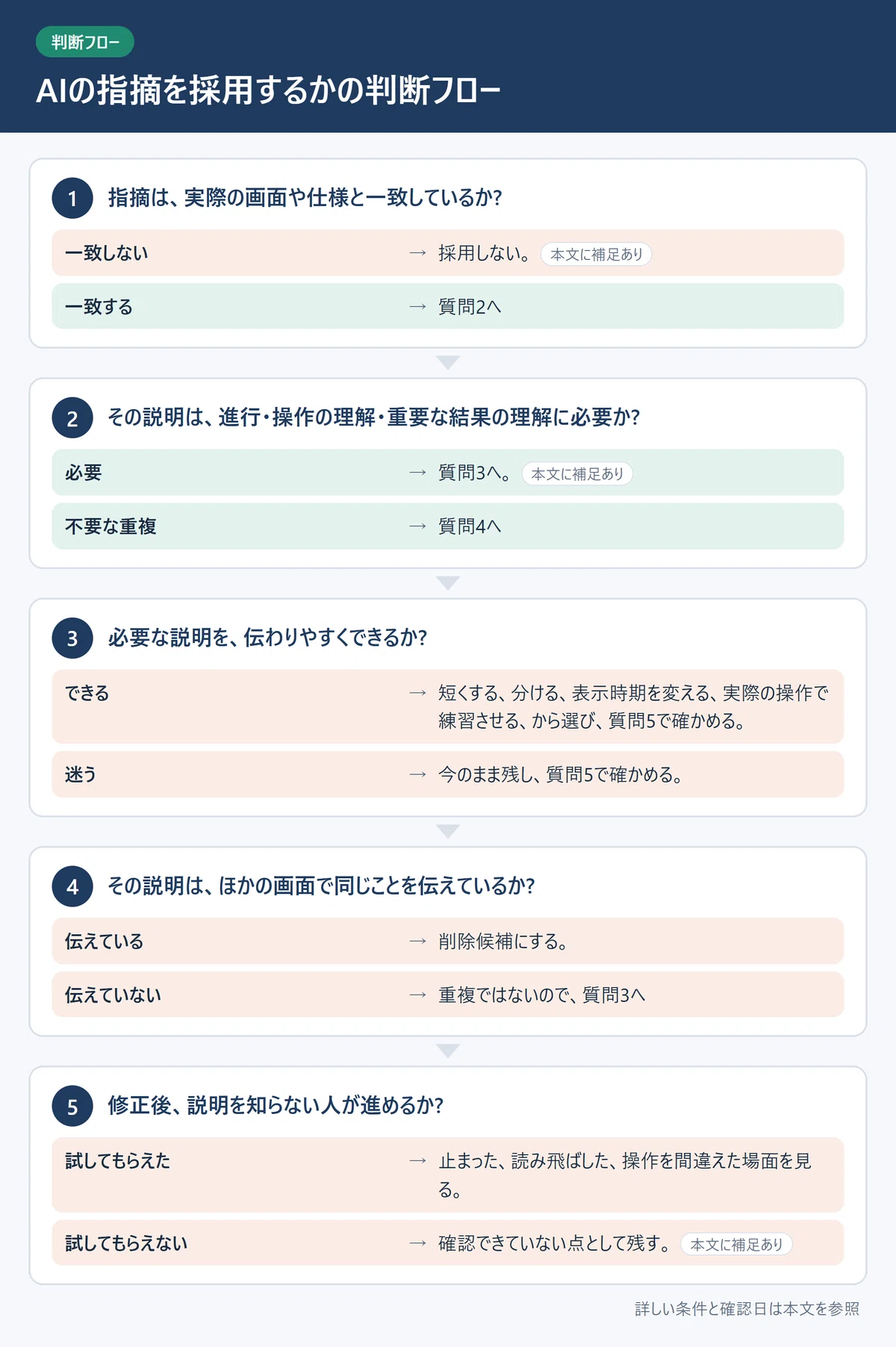
Evaluate AI feedback one by one in the following order.
-
Does the feedback match the actual screen or specifications?
・Does not match → Do not adopt. If the information provided was insufficient, supplement it and ask again.
・Matches → Go to Question 2 -
Is the explanation necessary for understanding progress, controls, or important results?
・Necessary → Go to Question 3. Even if it’s an action rarely used, like overwriting a save, keep it if it’s important.
・Unnecessary duplication → Go to Question 4 -
Can the necessary explanation be made easier to understand?
・Yes → Choose from shortening, breaking it up, changing the display timing, or having them practice with actual controls, then verify with Question 5.
・Unsure → Keep it as is and verify with Question 5. -
Is the same thing being conveyed on other screens?
・Yes → Make it a candidate for deletion.
・No → It is not a duplicate, so go to Question 3 -
After the revision, can someone who doesn’t know the explanation proceed?
・If you were able to have them try it → Observe where they stopped, skipped, or made a mistake.
・If you cannot have them try it → Leave it as an unverified point. Do not judge it as “clear” based only on the creator’s confirmation.
■ Checklist before and after review
[Before review]
□ Decided on the target player and assumed game experience
□ Wrote down the ID, display text, display timing, and conditions to proceed for each screen
□ Marked items you don’t know as “unknown”
[After review]
□ Verified that the feedback matches the actual screen or specifications
□ Verified that cutting explanations did not increase situations where players cannot progress or misunderstand controls (if you couldn’t have someone try it, left it as unverified)
□ Verified that explanations for important actions, such as overwriting a save, remain
□ Had someone try it and observed where they stopped, skipped, or made a mistake (if unable to do so, left it as unverified)
■ Note: AI feedback is a candidate for verification, not an answer
Whether AI feedback matches actual player reactions is unverified and not guaranteed.
Sometimes the feedback is accurate, and sometimes it is off-base because the information provided was insufficient. Decide whether to adopt it using the decision flow, and if possible, have an acquaintance actually play it to verify.
■ Summary: What to do today
You don’t need to put together every single screen from the start. Choosing just one screen you’re worried might cause players to get stuck is enough.
▼ What to do today
→ Choose one screen and write it out into a template
→ Show it to the AI along with the copy-paste prompt
→ Verify the feedback using question 1 of the decision flow