




Hello, this is Horiuchi from Renewer Inc.
On November 9th, Claude’s top-tier model, ‘Claude Fable 5.2,’ was released. In conjunction with this, the developer, Anthropic, has published a prompt guide specifically for Fable 5.2 in the ‘Claude Platform Docs’.
I previously decoded the Fable 5 version of the guide, which was released in July, in this article.
Upon reading this 5.2 version, I noticed that the content has changed significantly. The Fable 5 version focused on ‘conveying short policies,’ ‘actively using sub-agents,’ and ‘preparing memory.’
On the other hand, the 5.2 version shifts its focus to how to refine instructions that have already been written.
The official guide provides solutions for 10 specific symptoms, such as ‘simple requests taking too long,’ ‘stopping before the work is finished,’ and ‘asking for unnecessary approval.’
Therefore, I have once again summarized this as a Japanese explanation using easy-to-understand language, organizing it into 10 task-specific prompt patterns.
I have also translated the ‘ready-to-use prompts’ included in the guide into a format that can be used in Japanese.
Please note that some parts have been paraphrased for clarity, and some chapters have not been covered. Anthropic’s test results were measured using the original English text. Please check the original text for accurate details.
|
I also compiled the previous Fable 5 version into a guidebook.
This received over 1,000 downloads within three days of its release. Thank you very much.
I have also compiled this 5.2 version into a guidebook.
The 10 task-specific prompt patterns are illustrated and easy to understand.
In this article, I will introduce excerpts from it. Please see this guidebook for all the patterns.
“Claude Fable 5.2 Prompt Engineering Guide”
What kind of model is Fable 5.2?
First, let’s summarize the key points of the release. The source is Anthropic’s release article.
Fable 5.2 is built from the same base model as ‘Claude Mythos 5.2,’ which was released at the same time. Fable is a version with strengthened safety measures that anyone can use. Mythos is a version that can only be used by organizations that have passed a review.
The fact that performance has improved while the price has gone down is simply a welcome change.
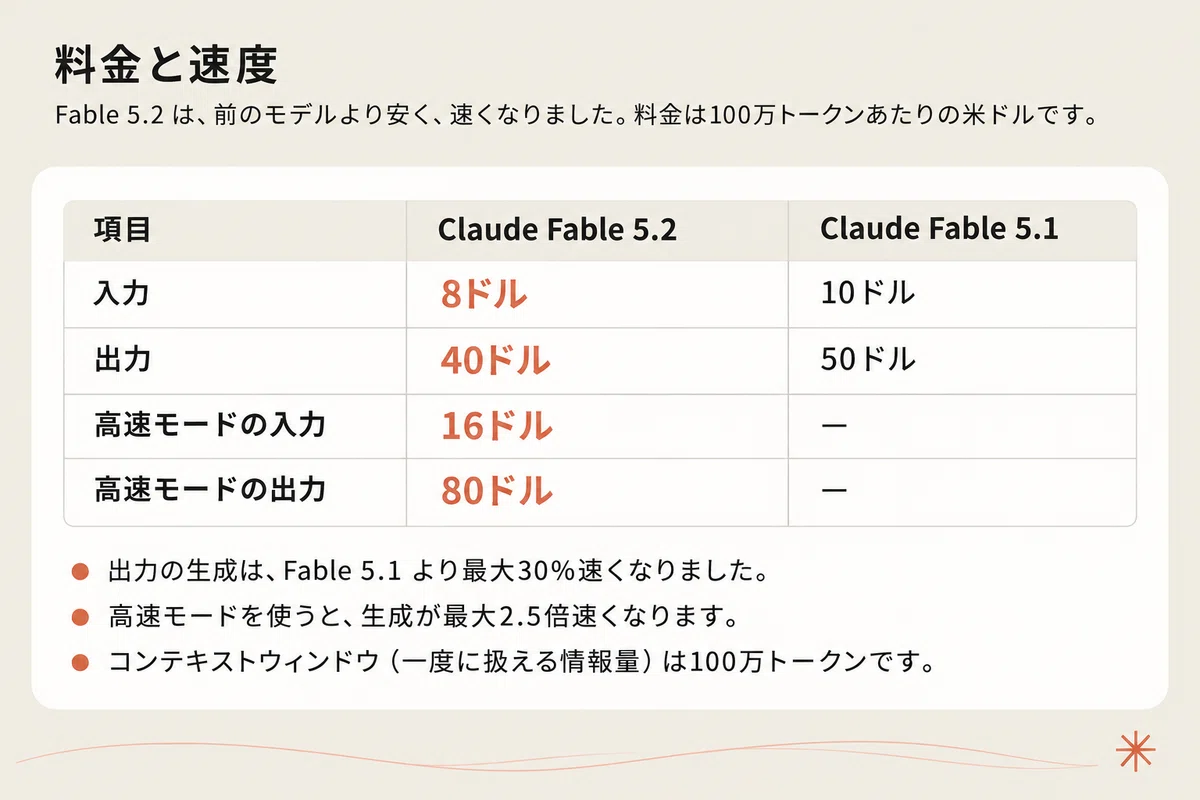
The pricing is $8 per million tokens for input and $40 for output. Fable 5.1 was $10 for input and $50 for output. Output generation is up to 30% faster than Fable 5.1. Using high-speed mode makes generation up to 2.5 times faster.
However, Anthropic does not say ‘use Fable for everything.’
They recommend starting with Claude Opus 5.5 for everyday coding and tasks. Fable 5.2 is positioned as a model for broad, open-ended technical tasks.
What has evolved?
The release article lists several internal achievements. I will mention three that left an impression on me.
Building an OS from scratch
An engineer entrusted the design of a prototype OS to Fable 5.2. Fable 5.2 coordinated over 1,000 sub-agents (other AIs entrusted with parts of the work) and continued working for 8 days. As a result, an OS that boots on a laptop was completed from an empty folder.
Formalizing Fermat’s Last Theorem in 30 hours
This is the task of rewriting a proof into a language that a computer can verify. In previous research versions of Claude, this took 11 days. This time, approximately 1,000 agents collaborated to finish it in 30 hours.
Migrating a production service from Python to Rust
After the migration, the service started up approximately 26 times faster.

All of these are ‘large tasks that take a long time.’ Early tester evaluations have focused on this point as well. For example, an Uber engineer reported the results of entrusting it with a 10-12 hour security audit. Fable 5.2 reportedly launched about 170 review agents and completed the task without stopping at convenient breaking points.
From here on, I will excerpt 8 out of the 10 task-specific prompt patterns and introduce them along with concrete prompts. The full text of all patterns and prompts is included in the guidebook.
1. Start with ‘high’ effort and adjust up or down
Effort is a setting that determines how deeply the AI thinks. It collectively influences the amount of thought, the time taken for a response, and the cost.
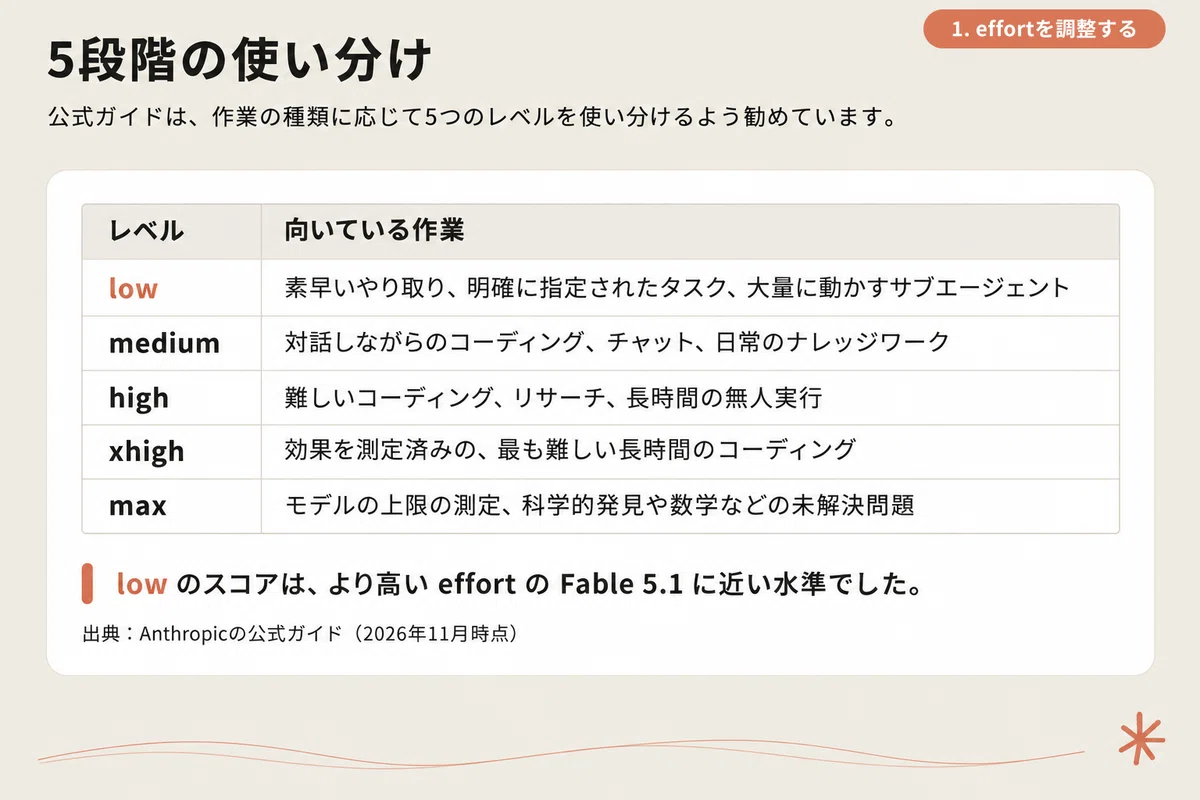
The official guide recommends starting with the API default of ‘high.’ From there, you can use the five levels as follows:
-
low: Quick interactions, clearly specified tasks
-
medium: Coding while interacting, daily knowledge work
-
high: Difficult coding, research, long-term unattended execution
-
xhigh: The most difficult long-term tasks with measured effectiveness
-
max: Unsolved problems such as scientific discovery or mathematics
The sentence ‘Most of the improvement in capability is gained by high’ is particularly important. It states that even when set to xhigh, the score only increases slightly while using far more tokens.
There is one more behavior to keep in mind. At ‘high’ or above, Fable 5.2 thinks even before responding to a greeting. Even if you instruct it to ‘answer without thinking,’ the thinking process did not stop at ‘medium’ or above. When a simple request takes too long, the correct solution is not to add more instructions, but to lower the effort.
Note that in the Claude app and Claude Code, the default effort is ‘Medium.’ I think it is practical to use it by increasing it only for difficult tasks.
2. Add instructions to ‘see it through’ so it doesn’t stop midway
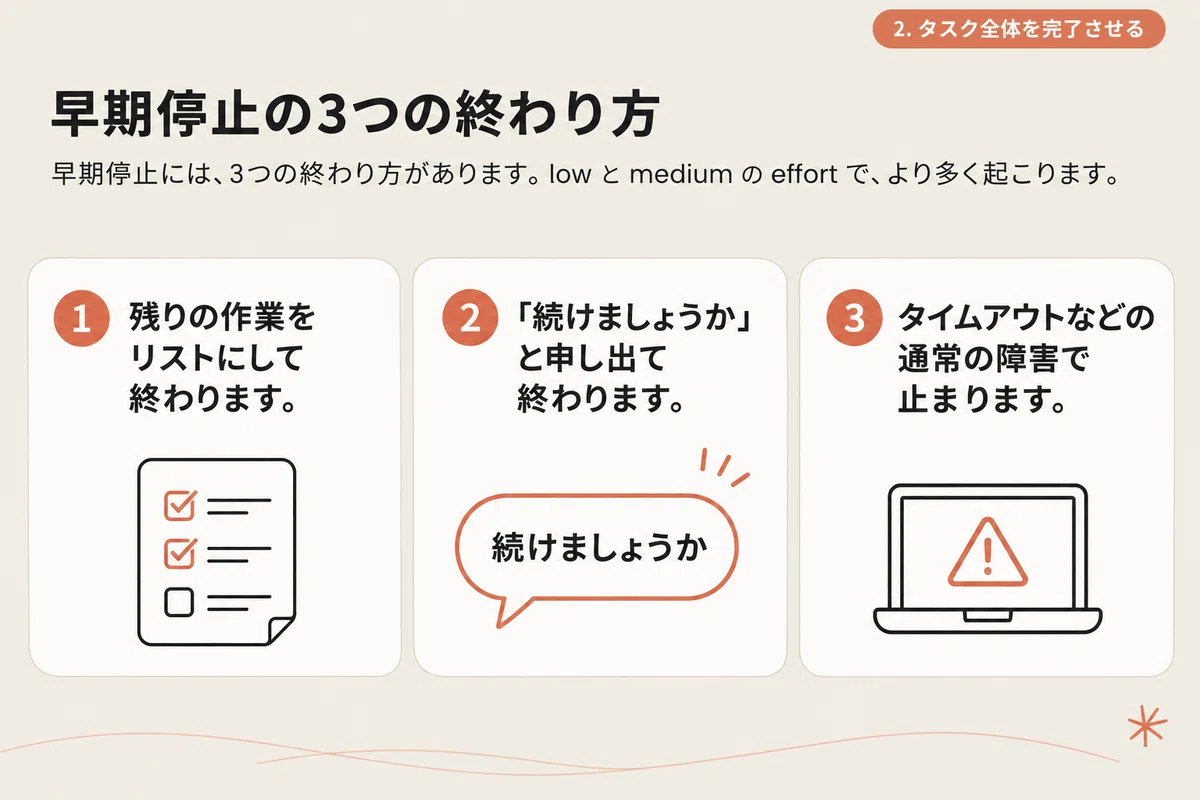
Fable 5.2 may end a turn in the middle of a long task. It might finish by listing the remaining work, offer to ‘continue,’ or stop due to a timeout. This happens more often when the effort is ‘low’ or ‘medium’.
The following prompt prevents this. Since the original text has four paragraphs, I will extract the main points and translate them here. The full text is included in the guidebook.
‘See the task through’ prompt (summary)
Do not stop as long as there is work remaining that was requested by the user.
For normal obstacles such as errors, timeouts, or tool failures, first diagnose the cause and overcome them using methods available within your current permissions.
Restrictions intentionally placed by someone, such as files specified not to be touched, should be left as is and reported.
This instruction does not override the need to seek confirmation before performing risky operations.
The important point of this prompt is that it distinguishes between two types of obstacles. Normal obstacles like errors should be overcome. Intentional restrictions should not be crossed. Because of this distinction, even if you tell it ‘don’t stop,’ it is less likely to run out of control.
In Anthropic’s tests, about half of the sessions ended with work left unfinished. On the other hand, output tokens increased by about 30%. I feel that including both the effectiveness and the costs is a sign of the official guide’s integrity.
3. Be specific about ‘what’ when requesting approval
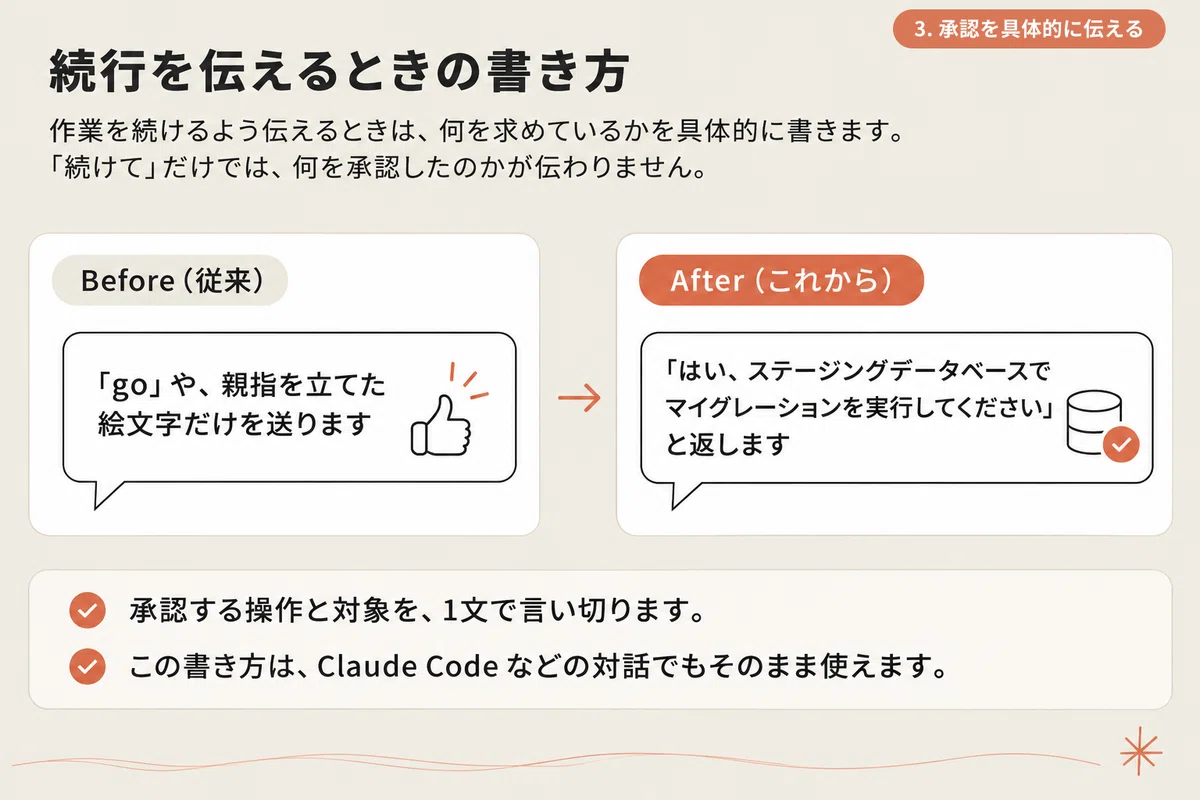
When the AI asks, ‘May I proceed?’, how do you respond? I suspect quite a few people just reply with ‘go’ or ‘OK’.
The official guide recommends being specific here. Instead of just sending ‘go’ or a thumbs-up emoji, reply with something like, ‘Yes, please run the migration on the staging database.’
Fable 5.2 applies written instructions exactly as they are. This also applies to approval rules. In Anthropic’s tests, they set a rule requiring approval for ‘sending messages to people outside of this conversation.’ As a result, the model reportedly refrained from about half of its routine requests to colleagues.
If you set broad rules, even daily tasks will be halted. It is important to be precise about the scope when defining operations that require approval.
4. Tell it, ‘This code is yours’
This was the item that particularly caught my eye while reading. Fable 5.2 reacts sensitively to descriptions of ‘who owns this code.’
When nothing is written about ownership, the model tended to add to the existing structure and leave duplicate code behind. It would also report nearby issues without fixing them.
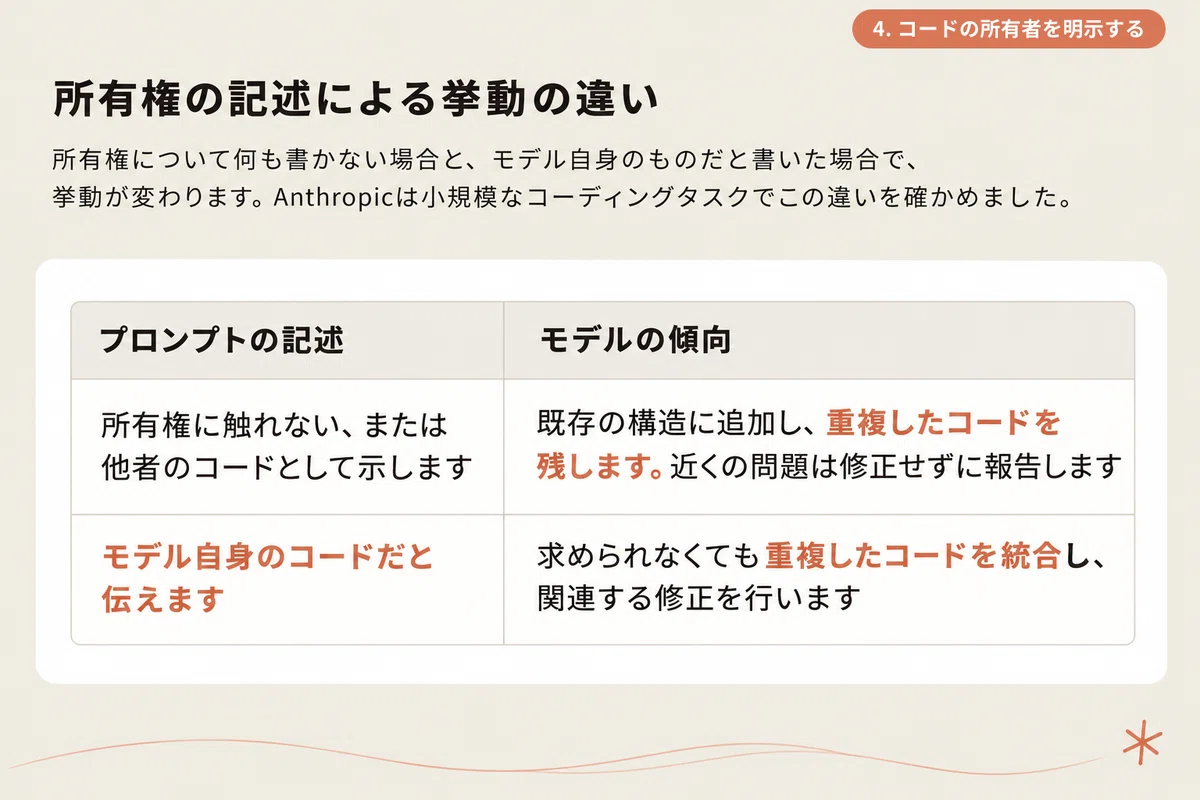
Therefore, if you want it to improve the structure while working, add the following sentence.
Prompt to convey ownership
You are the owner of this codebase and its long-term maintainer. The design is left to you.
Without this sentence, the model integrated duplicate code in less than 10% of executions. With this sentence, it rose to about 75%.
However, there are side effects. Output tokens increased by about 70-80%, and changes were made that were not requested. In some executions, the behavior of existing features also changed. It is noted that for projects where you want to minimize changes, it is better not to include this sentence.
5. Have it report progress one line at a time for long tasks
Fable 5.2 may write almost nothing for the user while tool calls continue for a long time. From the perspective of someone watching the screen, it looks like it has frozen.
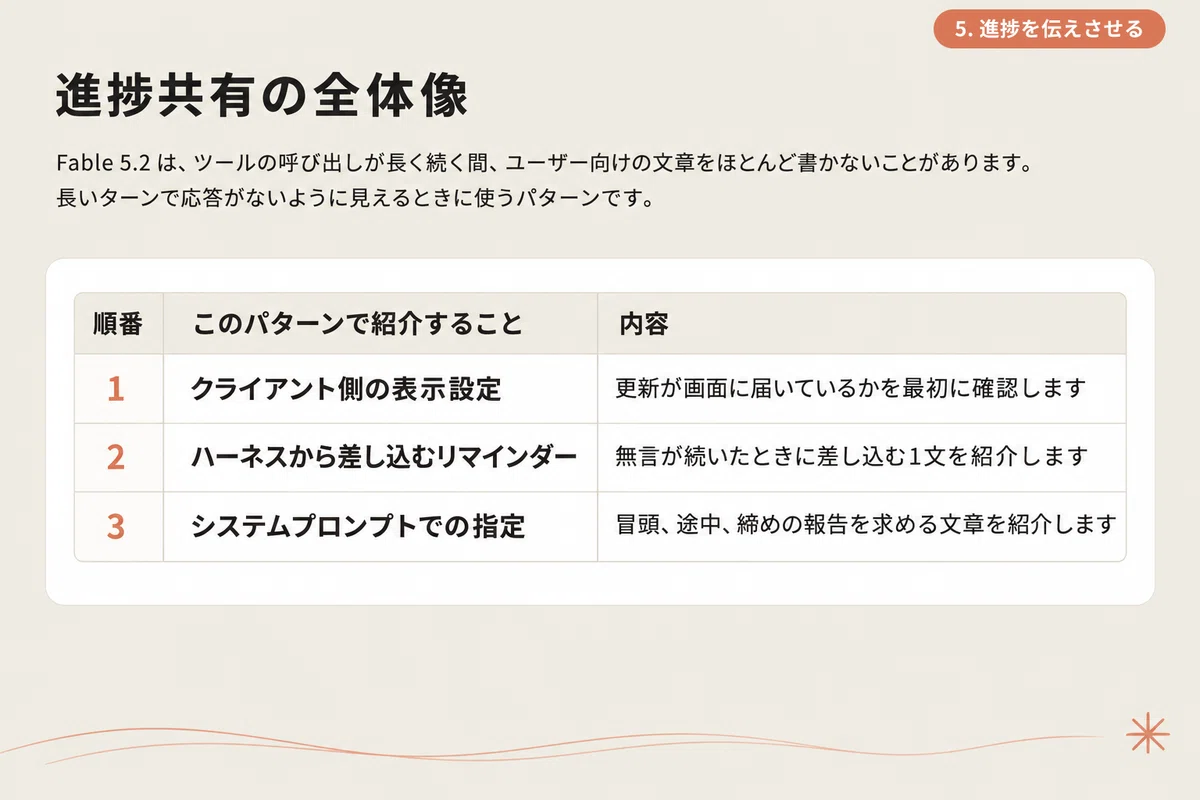
The solution is to add the following text to the system prompt.
Prompt to have it report progress
Before starting, please state in one line what you are about to do. Short status reports while working help the user follow the flow. Conclude with a short summary that can be understood just by reading that part (what was understood, what was done, and what will be done next).
With this text, the model spoke before every initial tool call. Output tokens increased by approximately 20%.
If you want to keep it simpler, just the following sentence is also effective.
Every few tool calls, please inform the user of the current situation in one line.
On the other hand, for asynchronous tasks where you only check the results later, the reporting interval is not that important. This is a prompt used in scenarios where a human is watching in real-time.
6. Use ‘cost’ to prevent over-delegation to sub-agents
The Fable 5 version of the guide recommended ‘frequent use’ of sub-agents. In the 5.2 version, the tone has changed.
How much Fable 5.2 delegates depends on the surrounding mechanisms and the task. In environments that use prompts encouraging delegation, it will delegate actively. And sub-agents can account for the majority of the cost.
When you are concerned about over-delegation, include the following three points in the description of the tool that launches the sub-agent:
-
How much the sub-agent will increase the cost
-
When it is worth delegating and when it is not
-
How to provide instructions to the sub-agent being launched
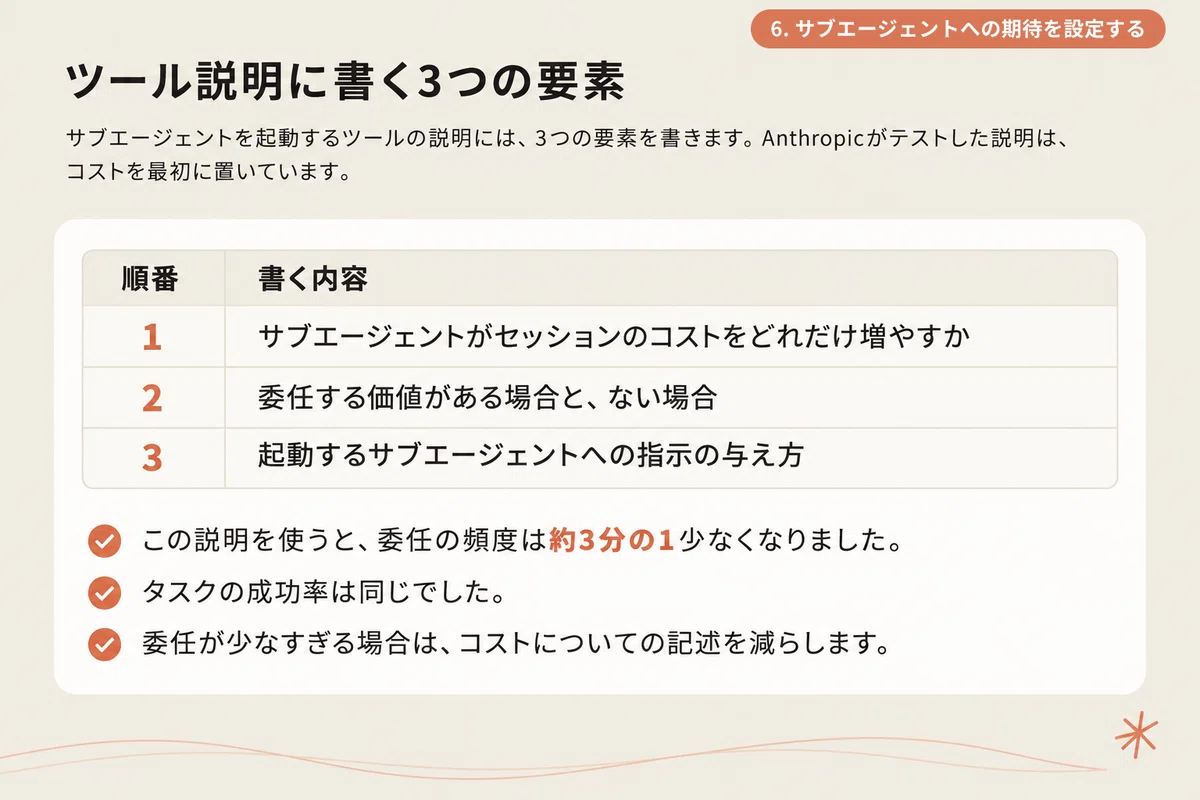
If it still delegates too much, write the sub-agent costs in more detail. In Anthropic’s tests (with high effort), using longer descriptions focused on cost resulted in about half the number of sub-agents compared to using short descriptions.
In other words, the design is to provide cost as a basis for judgment without saying ‘use it’ or ‘don’t use it.’ I feel this is the same mindset as delegating work to a person.
7. Inventory accumulated ‘prohibition notes’
Notes saying ‘never do X’ tend to increase without you noticing. They accumulate in places where context is carried over from past sessions, such as memory, notes, and instruction files.
Because Fable 5.2 follows these faithfully, it may ask for unnecessary approvals or refrain from routine tasks.
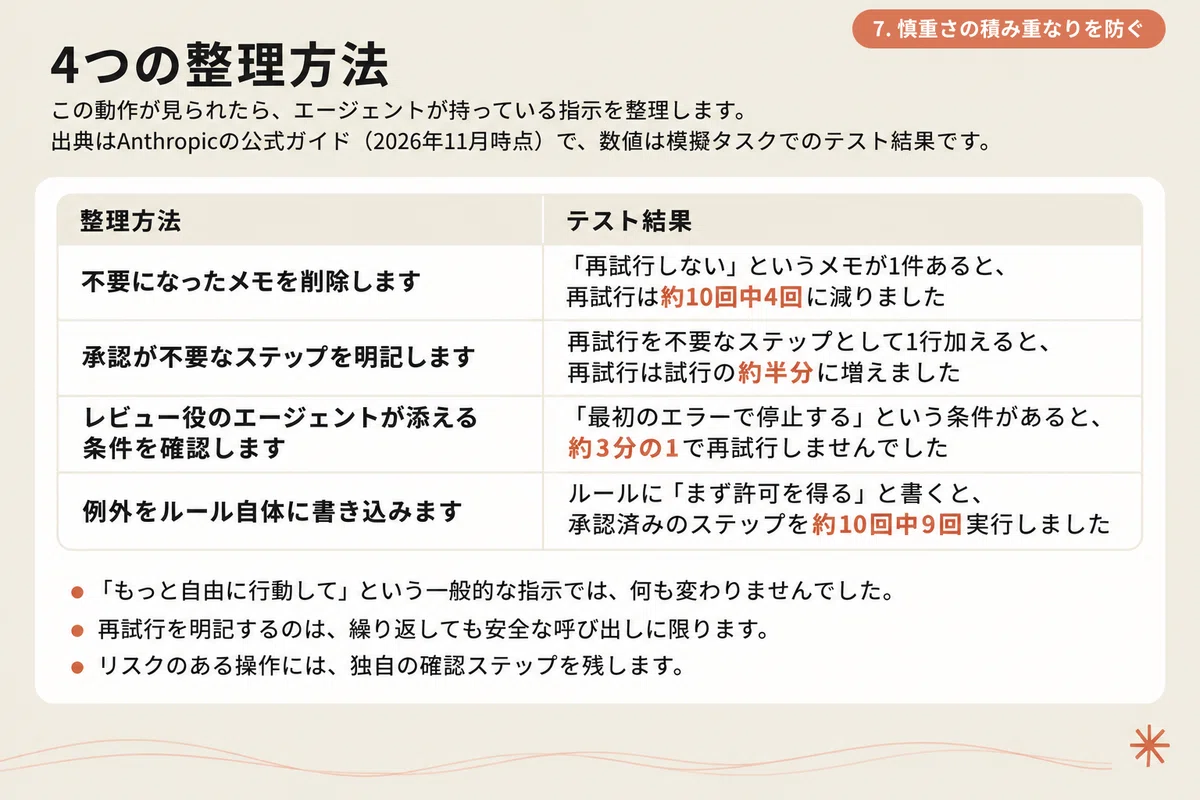
For example, if an old instruction like ‘never retry’ remains in memory, the model will continue to follow it. Anthropic confirmed this behavior in early tests, mainly in environments where multiple agents collaborate.
Four countermeasures are listed:
-
Delete notes that are no longer needed
-
Clearly specify steps that do not require approval
-
Check verification steps (remove or narrow the scope of conditions like ‘stop at the first error’)
-
Explicitly state exceptions (write ‘ask for approval before deleting files’ instead of ‘never delete files’)
Instructions like ‘act more freely’ are too vague to be effective. List the routine steps that the model is allowed to proceed with on its own specifically. It is also important to note that the model treats instructions containing ‘never’ as having no exceptions.
With the same mindset, I also review instructions written for previous models. I delete lines like ‘Answer without overthinking.’ I also remove strict writing rules like ‘Keep sentences under 20 words,’ as they make the writing sound awkward. With every generation of models, it has become necessary to ‘trim’ and revise prompts.
8. Have the final report written for a ‘reader without context’
Reports that arrive after a long task are read by people who have not seen the process. Abbreviations created by the AI along the way or conclusions placed at the end will not be understood by the reader.
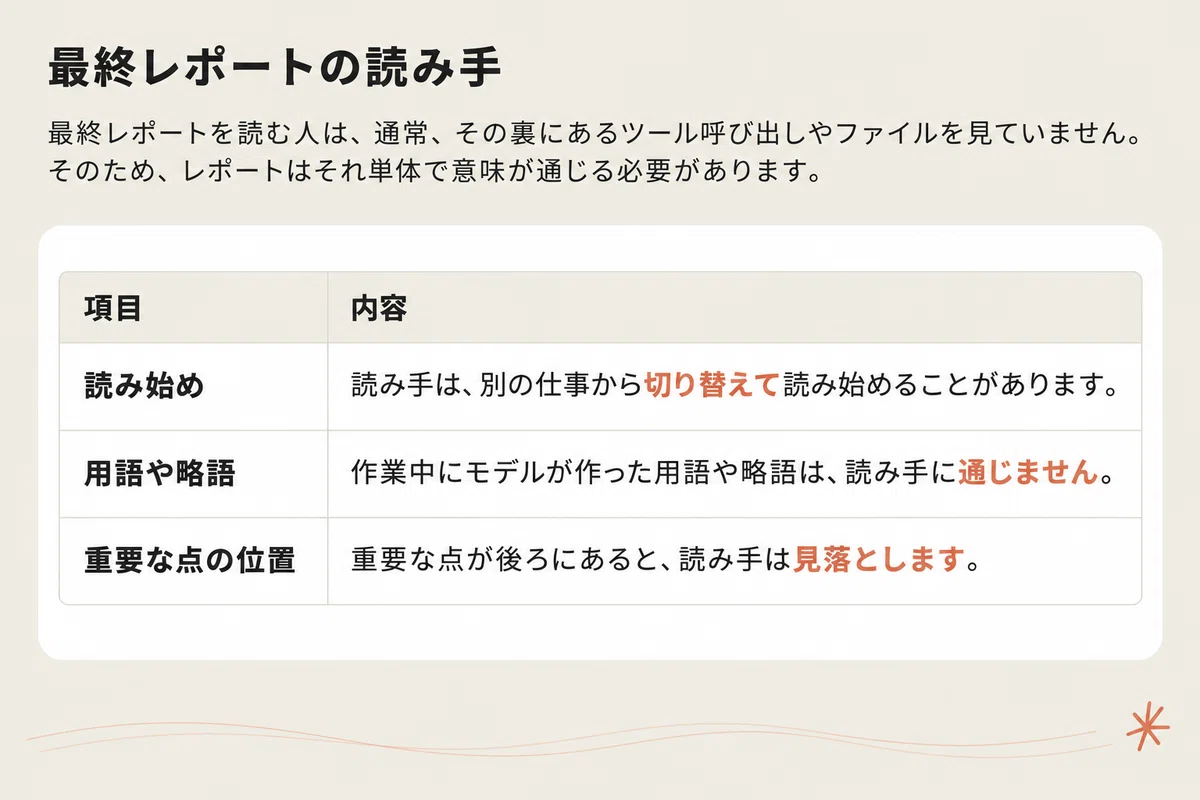
Therefore, when requesting a final report, I add the following text. Since the original has two paragraphs, I will translate the main points.
Prompt for ‘Communicating Clearly’ (Summary)
Write assuming the reader is intelligent but lacks context. The reader has not seen your tool calls, reasoning, or open files.
Place important points in the first few sentences.
Write in plain language with short sentences, and do not use terms or abbreviations you created yourself during the task.
In Anthropic’s tests, this text reduced information clutter in reports and shortened the sentences.
Although this is an instruction for AI, it applies equally to reports written by humans. The assumption of a ‘reader who is intelligent but lacks context’ is a standard I want to be conscious of in my own writing as well.
Summary: ‘Refining’ instructions is better than ‘adding’ to them
Looking back at the eight points introduced, a common trend emerges. As models become more faithful to instructions, old instructions can end up having side effects.
-
If you want to reduce thinking, lower the effort rather than adding instructions
-
If you want to stop over-delegating, communicate the cost rather than using prohibitions
-
If the AI starts being too cautious in its work, organize the accumulated notes before adding more instructions
The official guide also shows how to proceed with the transition at the end. Explicitly specify ‘high’ for effort. Re-read the prompts and notes you are inheriting. Run the longest task and record any concerning behaviors. Then, apply countermeasures one by one to measure the effect and cost, in that order.
Fortunately, the official guide includes these principles in the form of ready-to-use prompts. Try one out in your own environment first.
Thank you for reading this far!
The guidebook contains all 10 task-specific prompt patterns and the full text of the prompts.
Including patterns that could not be introduced in this article, you can download it for free from the link below. This is the sequel to the previous Fable 5 version, which was downloaded over 1,000 times within three days of its release.

Models like Fable 5.2 have emerged that can be entrusted with long-term work.
On the other hand, which tasks to entrust to AI can only be decided once the reality of the work is visible. In a survey released recently, among 103 practitioners at large companies promoting AI adoption, only 7% answered that they ‘understand the actual state of their organization’s work almost accurately.’
We provide the work visualization AI ‘Meboshi’.
Meboshi automatically records employees’ PC work for a certain period, and the AI identifies ‘tasks that should be entrusted to AI’ based on actual measurement data. Without relying on interviews or surveys, it replaces work visualization that used to take months with about two weeks of recording.
 Work visualization AI that places no burden on the front lines: ‘Meboshi’
If you are struggling with how to choose tasks to entrust to AI, please take a look.
Information on using Claude for work and business is compiled in the magazine below.
Please read it as well. If you like, please follow me.