


Artificial Intelligence (AI) has made content writing quick and simple. But many marketers and bloggers still face one big problem. AI text often sounds robotic and unnatural. Plus, it gets detected by AI detectors, causing trouble for many.
Readers and search engines both like content that feels real and easy to read. AI humanizer tools help fix this problem. They make AI text sound more natural and human-like. We are writing this post to introduce you to some of the best AI humanizer tools in 2026.
What Are AI Humanizers?
Before we get you into the list of the best AI humanizers, let’s talk a little about what they actually are. AI Humanizers are tools that are designed to make any text that sounds robotic natural and human-like. When a text is provided to this tool, whether written by a human or an AI writing tool, they remove robotic or flat tone from it and make the flow resemble real human writing.
If you search for AI humanizer tools online, you will find hundreds or thousands of results. But not every tool does the job well, we mean humanize the text perfectly.
Too many scammers are out there who are only meant to sell subscriptions. That is why we took over the headache and brought you these 3 handpicked AI humanizer tools that we personally tested and can say are good at humanizing texts.
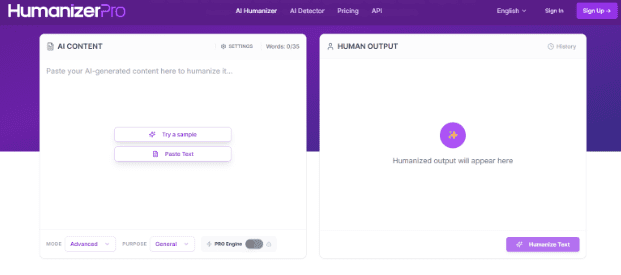
The first tool on our list is AI Humanizer Pro. This is a freemium AI humanizer tool that perfectly humanizes text that is flagged as AI or generally sounds robotic. The free version of the tool offers a limited word count, but that limit is removable with a premium subscription. Besides this, the tool is full of features that many others lack. And considering those features, the price is also not that expensive.
Here are the primary features that this humanizer is offering to users at the time.
- Offers three different humanizing modes, including:
- Basic: This mode humanizes text by bringing in some basic changes.
- Standard: This mode rewrites some parts of the text to eliminate robotic tone.
- Advanced: This mode completely rewrites the text, improves readability, and gives text an overall natural flow.
- Help you choose the purpose before humanizing the text, which helps the tool understand the intent of your text and gives better results.
Besides the above-discussed, Humanizer Pro also offers you some text cleaning settings. Using these settings, you can remove certain unwanted elements from your text. Especially, the text that is generated using AI tools often incorporates unwanted elements that can be removed while humanizing text. These include:
- The removal of Unicode characters.
- Eliminate unnecessary white spaces.
- Remove em dashes and replace them with commas.
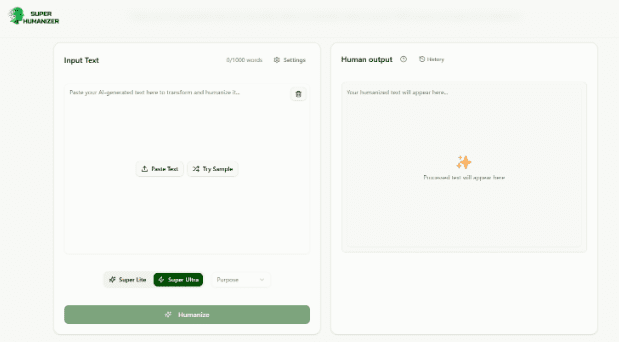
Super Humanizer is the second tool on our list that we found efficient. This one is completely free to use but comes with some limited features if compared with Humanizer Pro, the one we just discussed earlier.
Regarding the efficiency of the tool, we personally tested it and got good results. But to bypass some AI detection tools, we have to humanize two to three times. Well, you might already know that the efficiency of AI detectors themselves is much compromised. So, considering the completely free usage, we can say that the results are not that bad.
Regarding the features of this tool, here are the notable ones that caught our attention:
- Two humanizing modes:
- Super Lite: This brings minor changes to the text to humanize it.
- Super Ultra: Rewrites almost all the text in a natural, human style.
- Like Humanizer Pro, it also offers settings to clear text from hidden Unicode characters, em dashes, unnecessary white spaces, etc.
- The best thing we liked about this tool was its simple interface. You just land on the tool, get the input box in front, paste the text, and click humanize. That’s it, and the tool conveys results to you in seconds.
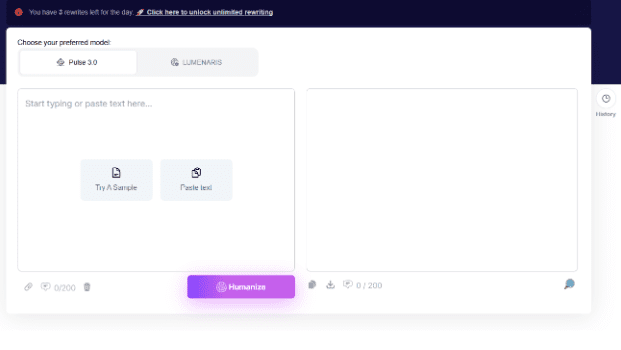
We personally didn’t test this one. It came from the suggestion of content writers in our team. As per their saying, they use it on a regular basis, and the tool really humanizes the text and removes AI detection.
We visited the tool and noticed the following features right away:
- Offers both free and premium modes. With a free one, you get 3 attempts to humanize text a day.
- There are two premium modes. One is Pulse 3.0, and the other is Luminar. We don’t know the concept behind these. But as per the writers using it, the Lumniar mode gives perfect results.
Conclusion
The above-discussed are the 3 best AI humanizer tools that make your AI text sound more natural and smooth. They help your content connect better with readers and pass AI detection tools more easily. However, always use these tools wisely. Do not depend on them fully. Use them to improve your writing, not to replace your real voice.