


OpenAI has announced that the Sora 2 video generation API will be discontinued on September 24, 2026. If you are calling Sora from your own systems, you need to decide on a migration destination.
Apart from the termination of the Sora interface or app, this announcement specifically concerns the “API” used to generate videos from your own systems or services. An API is an interface that allows you to call the functions of another service from your own infrastructure.
If you continue to call the same API after the termination date, the video generation functionality will stop working. Companies currently using it must decide on alternatives and proceed with switching and testing.
This article is intended for companies and developers who have integrated Sora via API, rather than those who were using the Sora interface.
I will explain in order what is being discontinued, how to choose a migration destination, and what to check before switching.
If you were using Sora via the interface, please check Sora 2 Web Version and App Ending | Can I Still Use It? for information on how to save data and alternative tools.
Key points of this article
â
OpenAI has announced September 24, 2026, as the end date for the Videos API and specific Sora 2 models
â
When choosing a migration destination, compare not only pricing but also video length, audio, image quality, and terms of use for your actual use cases
â
To prepare for future service terminations, keep a list of models currently in use and materials for comparing quality
What stopped working due to the Sora API termination?
The items OpenAI listed for termination on September 24 are the Videos API and specific Sora 2 model versions. In the official list of planned deprecations, the column for recommended alternatives is marked as “â”. At the very least, no OpenAI-made migration destinations are indicated in this list.
According to OpenAI’s deprecation list for developers, the following are subject to termination:
-
Videos API
-
sora-2
-
sora-2-pro
-
sora-2-2025-10-06
-
sora-2-2025-12-08
-
sora-2-pro-2025-10-06
OpenAI notified developers on March 24, 2026, providing approximately six months’ notice. The same end date is also noted in the Sora developer guide.
What is important to note here is that the recommended migration destination is listed as “none”.
If you wish to continue video generation equivalent to Sora, you will need to compare APIs from other companies. This is not a migration that can be completed by simply swapping model names.
The details from when the Sora 2 API was announced are summarized in the DevDay 2025 Announcement Record.
Which migration API should you choose?
Candidates include Google’s Veo 3.1 and Gemini Omni 1.1 Flash, Runway, and Kling’s developer APIs. First, identify the video length, audio, image quality, and editing methods your company requires.
The following are examples confirmed from each company’s official pricing page. These are dollar-denominated API rates and do not represent the total cost, including taxes, input materials, or additional processing fees. Kling is calculated based on the list price of its prepaid plans (confirmed as of September 24, 2026).
Pricing units and billing methods vary by company.
Google’s price list shows the per-second rate for Veo 3.1 and the per-token rate for Gemini Omni 1.1 Flash separately. Runway’s price list is in credits. The approximately $0.10/second for Gemini Omni is the conversion value for 720p output provided by Google, not the “total cost per second of finished video” including input.
On Kling’s official pricing page, Kling 3.0 at 720p is 0.6 units/second without audio and 0.9 units/second with audio. Converting at the list price of $0.14 per unit results in the amounts shown in the table. Standard prepaid plans start at $700, are valid for 180 days, and unused portions cannot be carried over or extended. If your usage volume is low, compare not only the per-second rate but also the prepaid amount and the possibility of expiration.
Another point of interest is Runway’s developer API.
Runway’s API lists Veo 3.1 and others in its price table in addition to its own models. However, even if you consolidate your point of contact, it does not mean that video length, input format, audio, or quality will be the same. Do not assume that it will work without verification just by changing the model name.
Comparisons of tools for use on screen are explained in Which alternative tools are available after Sora ends? and Recommended AI Video Generation Tool Comparison. Details on Gemini Omni are summarized in What is Gemini Omni 1.1 Flash?.
What changes with migration? What should you check?
With a migration destination API, the seconds per generation, resolution, audio, and calculation method for fees will change. Even if you use the same text instructions, you will not get the same video. Before switching in production, compare using your usual requests and the finished output. For example, in the Veo 3.1 official guide, the generation lengths are 4, 6, and 8 seconds.
Here is a summary of items to check during migration.
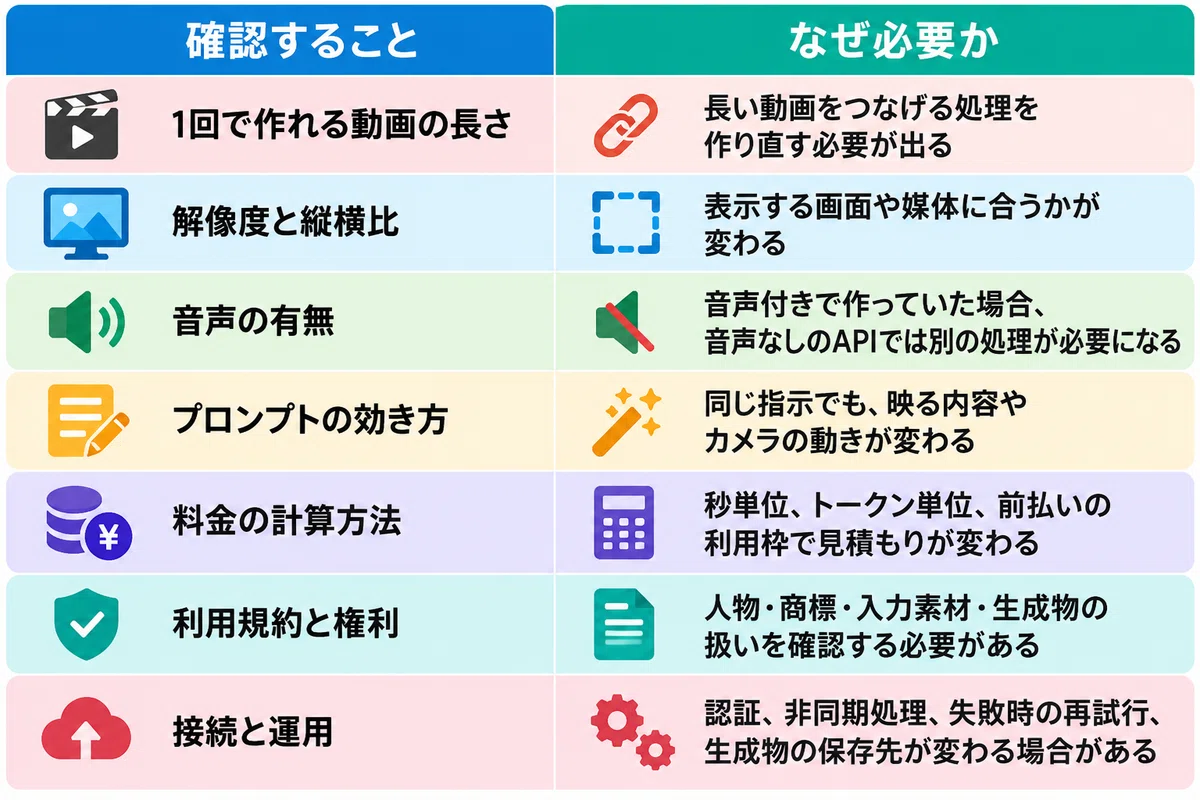
Prompts are particularly easy to overlook.
Instructions adjusted for Sora may not work as expected with other models. In addition to frequently used requests, select requests where failure would be problematic, such as “human hands,” “screens with text,” or “with audio,” and test them under the same conditions. Have a reviewer record whether the quality is acceptable.
If you are using generated videos for commercial purposes, please also check the terms of service of the migration destination. The way of thinking is summarized in Can AI-generated images be used commercially?.
For those who want to organize their current usage and quality requirements before choosing a migration destination, the AIworker service materials are useful.
â¶ï¸ Download service materials (request materials)
Which AI model will end next?
OpenAI’s list of planned deprecations also includes deadlines for models other than Sora. Even if you are not using Sora, you should check it against the model names you are currently using.
Here are the main items extracted from the official deprecation list (verified as of September 24, 2026).
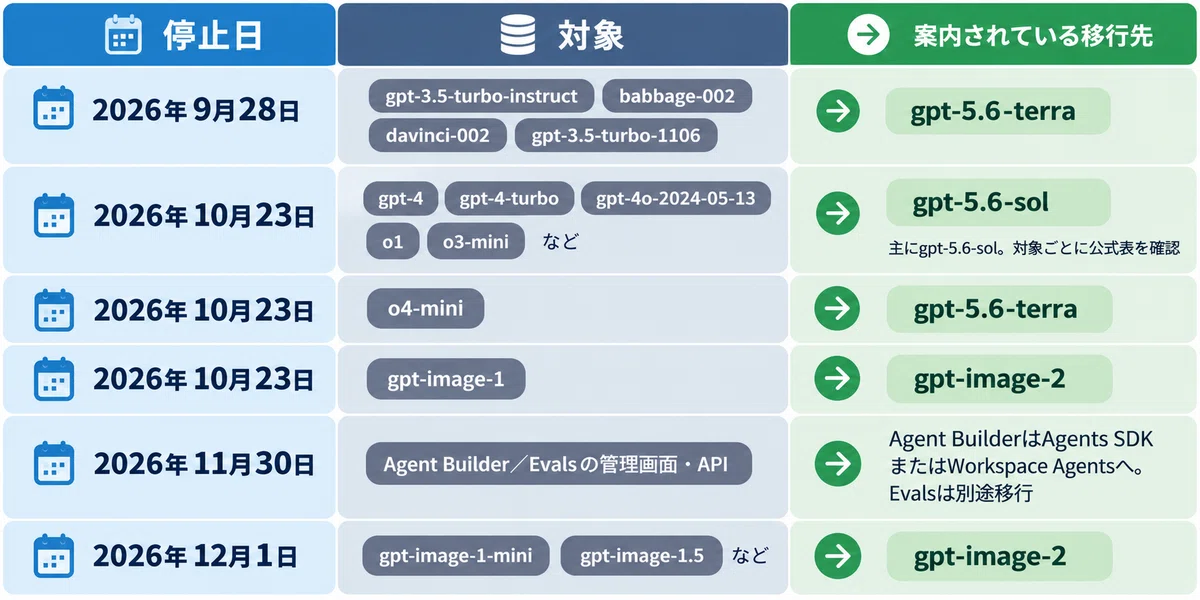
OpenAI also provides guidelines for notice periods.
-
Generally available models: At least 6 months in advance as a general rule
-
Models for specific use cases: At least 3 months in advance as a general rule
-
Preview versions: Notice periods may be shorter
This is a guideline for OpenAI’s deprecation policy and does not guarantee the duration of all models. For preview versions in particular, you need to take preparations for changes and terminations seriously.
This is not limited to OpenAI. Google’s Gemini Omni Flash model information lists the stable version ‘gemini-omni-1.1-flash’ and preview versions separately. Please check not only the product name but also the actual model ID being called and its availability status.
The differences between GPT-5.6 and GPT-6 models are summarized in What are the differences between GPT-6 and GPT-5.6?.
How to prepare for the end of model availability?
The basics of preparation are to understand the models you are using and to ensure you are in a state where you can test whether your operations can be handled by alternative models. Consolidating the model calling parts makes it easier to track changes, but because generation quality and input formats differ, the switching process itself does not become unnecessary.
Specifically, please check the following points:
-
Have you consolidated model calls into one place and made it possible to switch model names via settings?
-
Are you managing a list of the models you use and their respective termination dates?
-
Have you decided on the person responsible for checking each company’s deprecation list and the frequency of those checks?
-
Are you saving generated videos, original images, and prompts in your own storage?
-
Are you using preview version models for important production processes?
-
Are you saving representative requests and their outputs to compare quality when you migrate?
The last item is often overlooked.
Without materials to compare, you cannot judge whether the quality of the migration destination is sufficient. The requests and comparison results used in this migration from Sora can be used as-is for the next migration. Keeping a record of the migration itself becomes preparation for the next time.
The basics of APIs in general and cost management are explained in Introduction to OpenAI API.
Frequently Asked Questions (FAQ)
Q. Can I no longer use the Sora API?
OpenAI has announced September 24, 2026, as the end date. Companies currently using it should check their operational status and avoid building workflows on the assumption that they will continue to use the same API. The fact that an end date is officially listed is separate from confirming the shutdown in individual systems.
Q. Is there a video generation API within OpenAI that can replace Sora?
As of September 24, 2026, OpenAI’s list of planned deprecations does not indicate a recommended alternative for Sora 2. If you wish to continue video generation, please compare APIs from other companies such as Google or Runway.
Q. Which migration destination is the cheapest?
Among the candidates whose official pricing was checked for this article, the lowest unit price for 720p video output is $0.05/second for Veo 3.1 Lite. However, total costs vary depending on input, regeneration, additional processing, and required quality. Do not choose based on unit price alone.
Q. Can I create the same video with the same prompt?
You cannot. If the model is different, the content and movement shown will change even with the same instructions. You will need to test your previous requests on the migration destination and adjust the prompt text.
Q. What happens to videos created with Sora in the past?
Video files already retrieved to your own storage will not be automatically deleted due to the API shutdown. However, please check the terms regarding contracts, rights, and materials to see if you can continue using them. For videos and generation jobs that only exist on the API side, urgently check the retrieval deadline and storage status. For videos created on the screen, please see the Sora Web Version/App article.
Q. Where can I check the shutdown dates for other AI models?
OpenAI lists the targets and dates in the Deprecation list for developers. For other providers as well, keep a record of the model IDs you are using and cross-reference them with each company’s official announcements.
Building a system that doesn’t stop even when AI models change | AIworker Support
The notice of the Sora API shutdown reminds us that AI integrated into business operations also has a “usable lifespan.” To avoid panic next time, it is important not only to look for alternatives but also to decide what criteria must be met to switch.
AIworker supports everything from organizing target tasks to model comparison, quality verification, and post-migration operations. You can start by aligning the necessary video conditions and verification methods for a single task.
AI Native X Training | Increasing the number of people who can compare and choose models
Using actual requests as subject matter, you will try the same work with multiple models and get hands-on experience comparing quality, time, and cost. This training ensures you take away what to compare and how to make decisions when models change.
AI Native X Accompaniment | Incorporating model lists and shutdown dates into operations
Enter the field, create a list of which models are used for which tasks, and establish operational procedures for confirming shutdown dates and making migration decisions. Create a state where, even if the person in charge changes, the next service termination can be identified and comparison materials are readily available.
Business AI Pro | Building a system that allows for model switching
Design the system for integrating video and text generation, including call components, permissions, logs, and human verification steps. Structure it so that dependencies can be identified, making it easier to compare and modify when changing models.
We accept consultations such as ‘I want to decide on a migration destination from the Sora API’ or ‘I am not able to track the shutdown dates of the AI models I am using.’ After hearing about your current system and objectives, we will work together to organize where to start, whether it be training, hands-on support, or development.
â¶ï¸ Download Service Materials (Request Materials)
â¶ï¸ Book a Free Consultation / AI Utilization Diagnosis
Author Information
AIworker Inc.
We support companies with generative AI adoption, talent development, and business process improvement. Based on challenges identified from over 1,000 corporate business meetings, we provide generative AI training, business AI/AI agent development, and hands-on support in the field. We focus on creating a state where AI continues to be used in actual operations, rather than just ‘training and finishing’.
AIworker Inc.: https://ai-worker.net/
If you found this article helpful, please give it a ‘like’ as it encourages our future article creation.
Reference Materials
#Sora #Sora2 #SoraAPI #OpenAI #OpenAIAPI #VideoGenerationAI #VideoGeneration #AIVideo #API #APIMigration #Veo #Veo31 #GeminiOmni #Runway #KlingAI #Kling #ServiceDiscontinuation #EndofService #ModelMigration #AIModel #GenerativeAI #AIUtilization #AIImplementation #AIDevelopment #SystemDevelopment #Engineer #Developer #RiskManagement #VendorLockIn #AIGovernance #DXPromotion #BusinessAutomation #BusinessImprovement #ITDepartment #GenerativeAITraining #AITraining #HandsOnSupport #AIworkerInc #AIworker