



I asked the AI to create materials, but
halfway through, the story started to drift.
Even if I rewrite the prompt,
I have to do it all over again…
Have you ever felt troubled by this? 😢
In the end, I have to check everything myself and
fix it.
If that’s the case, there’s no point in delegating it, is there…
But actually,
what improves AI accuracy is not the prompt, but ‘evaluation along the way’.
Especially…
if you are someone who keeps fixing prompts
every time the AI’s answer is subtle,
please read to the end.
Now, let’s take a look!
If you want to watch it in a video, click here.
AI mistakes are caused by the ‘multiplication’ of steps
I’ve recently started preparing something like a harness for the AI
to run it.
However, it’s not working very well yet, and
the AI isn’t giving me good answers.
AI agents are very capable.
Even so,
why does everything fall apart when you delegate work to them?
For example,
suppose there is an AI that can complete
a single step with a 95% probability.
95%.
Looking at it one by one, that’s quite high, isn’t it?
Now, if you delegate a job with
10 steps to this AI all at once,
what percentage do you think the final accuracy will be?
The answer is about 60%.
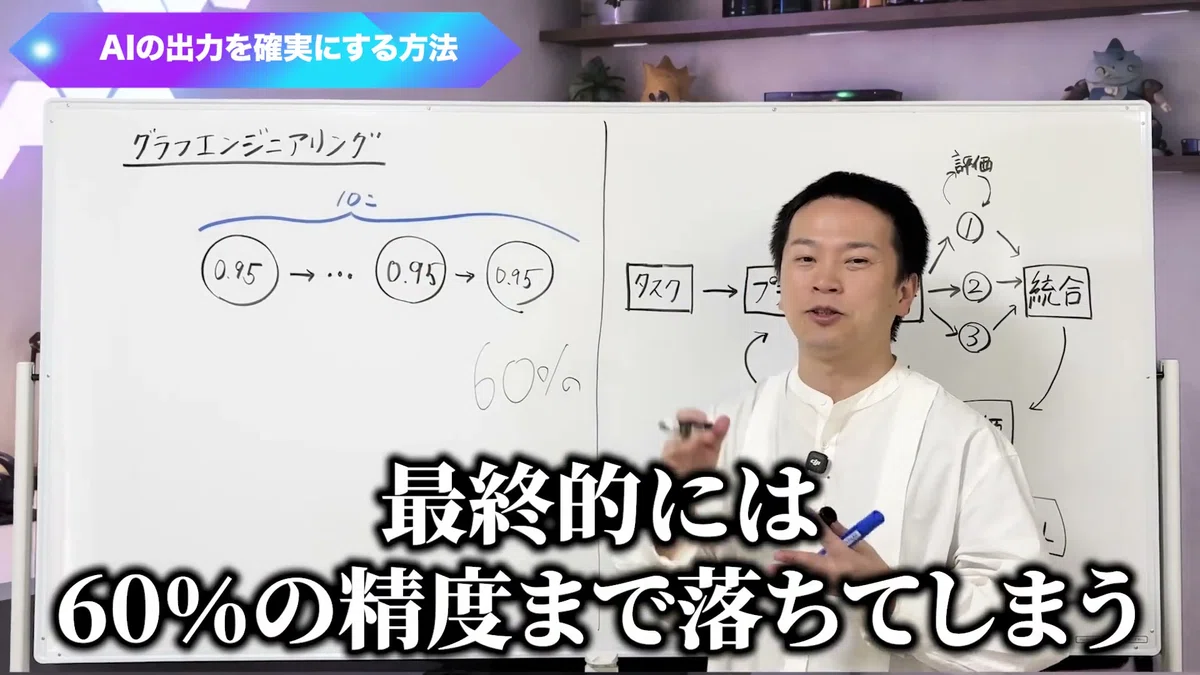
Multiplying 0.95 by itself 10 times.
Even if it’s capable at each step,
as the steps stack up, the deviations accumulate.
That is why
delegating long tasks to an AI is actually very difficult.
Polishing your prompts barely improves accuracy
No matter how much you refine your prompts, the structure of multiplication does not change.
When accuracy is subtle,
this is the first thing that comes to mind, right?
If you write the prompt well, it should work, right?
For example, suppose you refine the prompt and
manage to raise the first step from 95% to 98%.
But if the subsequent 9 steps
remain at 95%…
The overall accuracy
hardly improves at all.
Prompt engineering alone
has its limits.
That is not because your prompting is poor.
The very form of stacking steps in a single path has
its limits.
Accuracy does not drop if you place an ‘evaluation’ in the middle
Place an evaluator in the middle and have it redo the task until it gets an OK. This is the answer.
So, what should you do?
In a word,
you insert a ‘loop’ in the middle of the process.
-
Attach an evaluator, and proceed to the next step only when an OK is given
-
Have it generate multiple answers and choose the best one by voting
-
Set up an evaluator for the final output as well to verify if the accuracy has truly improved
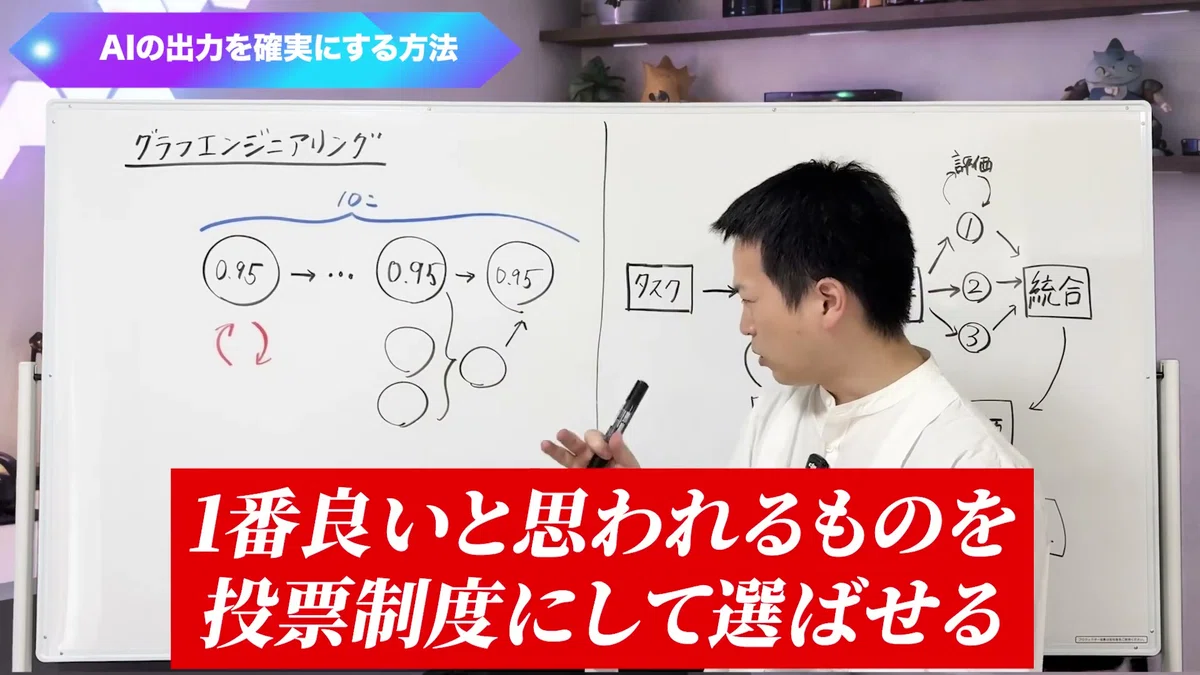
This is the same as a game of telephone.
In a normal game of telephone,
it might be correct at the beginning,
but by the end, it turns into completely different words…
However, if you have someone in the middle
who tells you the answer, or
if you collect opinions from several people and take the most common one,
You want the right words to reach the end, don’t you?
Creating these individual loops is called
Loop Engineering.
Graph Engineering is a bundle of loops
Bundling loops together and adjusting the whole thing effectively. That is Graph Engineering.
Recently, the term
“Graph Engineering” has emerged, which goes beyond Loop Engineering.
It started when Peter, the developer of OpenClaw who popularized Loop Engineering,
jokingly said, “Are you still talking about loops? It’s all about graphs now.”
(Even though he was the one who popularized it… lol)
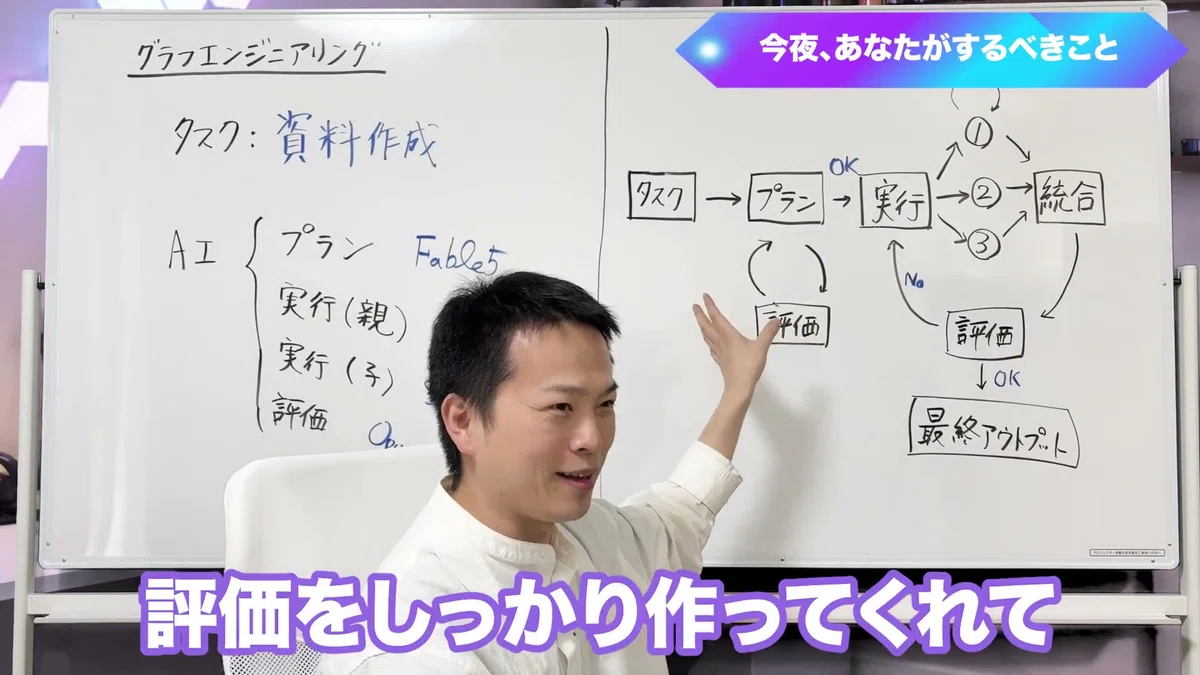
The overall flow looks like this.
-
Ask the AI to perform a task
-
AI thinks of a plan → Evaluation (humans also look at this here)
-
For example, three AI agents execute at once → Evaluation
-
Combine the three outputs into a final output → Evaluation
-
If it’s NG, restart from execution
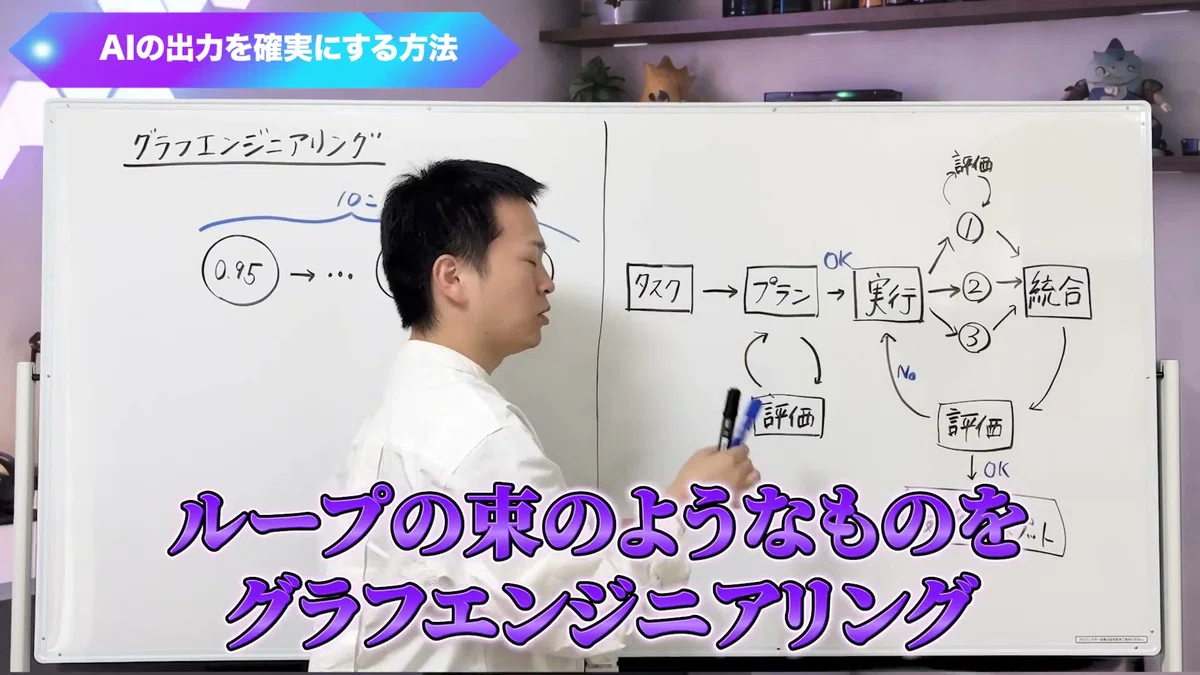
Something like this,
a bundle of loops, is what we call Graph Engineering.
In short,
bundling loops, synthesizing them, and placing evaluators.
It’s about designing the entire mechanism well.
You don’t have to build a graph from the start
However, there is no need to create a complex graph from the beginning.
Hearing this,
you might have thought, “Do I really have to do something that complicated?”
But don’t worry.
In the research data, there were tasks where
the graph was made too complex,
which actually caused the accuracy to drop as a result.
If a task can be completed successfully half the time with a single AI agent,
the results showed that there is no need to build a graph.
Therefore, the order is as follows.
-
First, try having a single AI agent do it in sequence.
-
If the accuracy is mediocre, try building one loop.
-
If that still doesn’t work, try increasing the loops, combining them, or using a voting system.
If you don’t have any trouble,
sticking with one AI is fine 😌
Place the smartest AI at the most upstream position.
Now, let’s look at how to build it.
The theme will be document creation.
Creating slides and project proposals is
incredibly tedious, isn’t it?
Even if you leave it to AI,
it almost never comes out perfect on the first try.
And here is a question.
In the flow of creating these documents,
among planning, execution, and evaluation,
where do you think you should use the smartest AI?
…
The answer is planning.
Since it is the most upstream,
if this part is wrong,
no matter how excellent the execution team is, it will head in the wrong direction.
Anthropic’s official documentation also says
that you should use a superior model for planning.
For execution as well,
there are parent execution teams and child execution teams.
Wouldn’t it be better if all three were excellent?
Actually, that is not the case.
Just like the relationship between a manager and an employee,
make the parent model more capable.
If the parent is capable,
it can give appropriate instructions to each one.
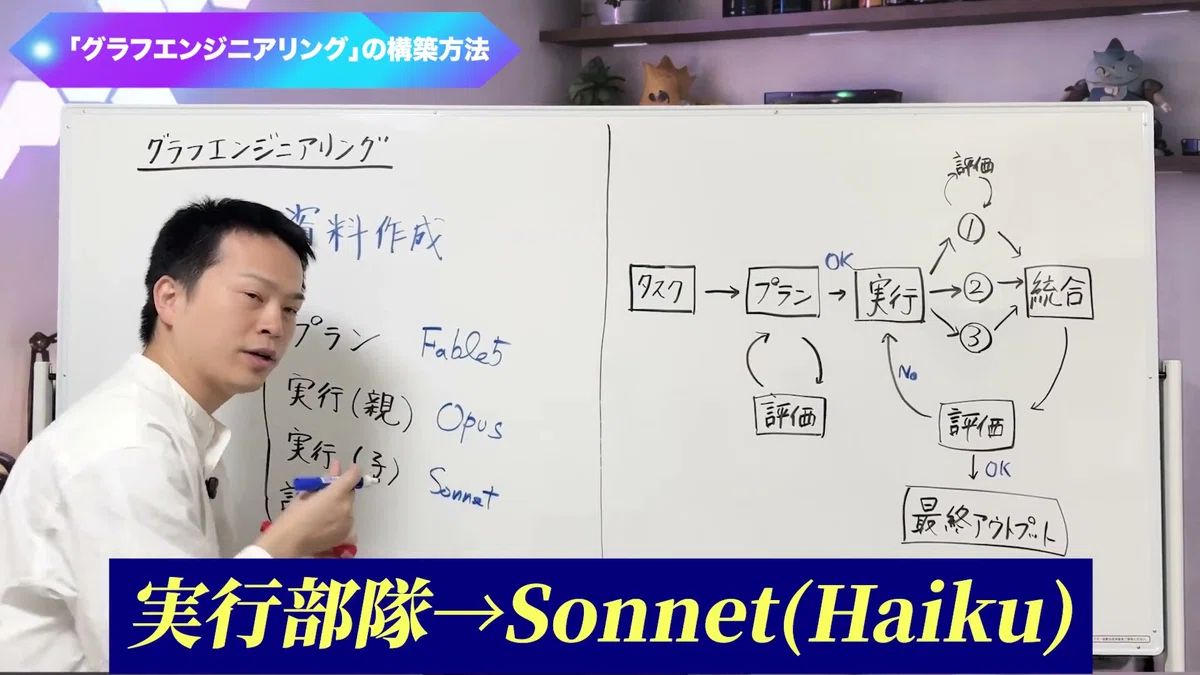
For example, with Claude, the guidelines are as follows.
-
Plan: The most capable models, such as Fable 5.2 or Opus 5.5
-
Plan evaluation: Opus (only here, use a capable model for review)
-
Execution parent: Opus
-
Execution child: Sonnet. For very simple tasks, Haiku is also fine
-
Child evaluation: If cost is a concern, use Sonnet or similar
-
Final evaluation: Since this is important, use Opus
There is no single fixed correct answer.
However,
smarter at the upstream, cost-effective at the downstream
—if you remember this, I don’t think you will go far wrong.
Have the Skill Creator build the mechanism
You can even leave the creation of this mechanism itself to AI.
That said,
taking inventory of tasks and
thinking about which AI to place where is difficult, isn’t it?
That is where you use the
Skill Creator created by Anthropic.
When you use the Skill Creator,
-
it creates an evaluation criteria for what constitutes a passing score
-
it even designs which AI will perform the evaluation
-
it creates the parent agent and the sub-agents
-
If you try it and it feels off, it will fix it through feedback
It takes care of both small loops and large loops
entirely.
If you say ‘I want to create this kind of document’ and
activate the Skill Creator,
this mechanism can be built.
Even if the human’s request is vague,
it will ask ‘What do you mean?’ from its side, so
you can naturally inventory your tasks.
By the way, I
am creating all of the dozens of skills I currently have using the Skill Creator.
There is one thing to be careful about.
When you use the Skill Creator,
you can end up building extremely complex mechanisms.
As a result, it takes time, and
sometimes the results are mediocre.
In that case,
you just need to give feedback saying
‘Make it simpler’.
Another method: Write it on paper and give it to Codex
There is one more interesting method.
Someone at OpenAI said that
you can draw the flow of the graph on paper,
and just hand it to Codex saying ‘Implement this workflow’—that is the way to do it.
There is an evaluator here,
there is a planner here,
and there is an execution team here.
If you can draw a diagram like that,
you can do it that way too.
In the first place, the word ‘graph’ is
a name that was attached later.
Place an evaluator.
Think of a plan.
Divide the execution team.
This is what we have been doing all along.
(However, since it is difficult to draw on paper, I think the Skill Creator is easier 😂)
First, start with one AI
I will summarize today’s talk.
-
Even with an AI that is 95% accurate, if you continue for 10 steps, the accuracy drops to about 60%
-
No matter how much you polish your prompts, the multiplication structure remains the same
-
Place an evaluator in the middle and have it redo the task until it gets an OK (a loop)
-
Bundling those loops and designing the whole system is what we call Graph Engineering
-
Start simple. You can just have a skill creator build the mechanism for you
Today, I talked about a new term called
Graph Engineering.
But what is truly important is
solving problems with systems, not with sheer willpower instead.
Trying hard to rewrite prompts over and over again.
That is willpower.
Placing an evaluation in the middle and
having it redo the task until it gets an OK.
That is a system.
Even with the same AI,
the only thing that changes is the structure.
For today,
choose one task you are currently delegating to AI,
and try running it as a single AI.
If you feel there are too many retries,
ask a skill creator to
‘create a skill for this task,’
and have them insert one evaluation loop🔥
For those who want to raise an AI into a ‘right-hand person’ that doesn’t make mistakes
Today, I talked about improving accuracy by
placing evaluations in the middle of AI processes.
An AI that runs evaluation loops
combines with your notes and judgment criteria,
and only then does it become a true right-hand person.
I have summarized that big picture
in a 20-minute free video
called the ’10X Roadmap.’

In this video,
I talk about the following:
-
Smart information processing techniques to avoid drowning in data
-
How to master AI while training your own brain
-
The big picture of a system that turns information into thinking and intellectual assets
-
How to break free from mass-produced AI content by adding your own personality
-
A mechanism for raising an AI agent to become your right-hand person
Register your email address to view it immediately.
Please take a look if you’d like.
Receive the 10X Roadmap
See you later!